Kee-Young Moon (she/her/hers)
Digital Services Librarian
University of Maryland Libraries
Abstract
In the education field, a strategy known as bitesize learning was introduced to deliver concise instruction on specific topics. By offering short and focused training, the time required to attend a full session is reduced, allowing trainees to build knowledge gradually over time rather than through a single training event. Online training sessions serve as a viable option when face-to-face sessions are not feasible and can be effective for staff training when combined with other factors. Furthermore, these training modules are integrated with the staff interface for easy access offering help when needed. This readily available training eliminates the need to schedule training sessions and ensures that staff can access and receive support as needed to help complete tasks.
Introduction
DPI (Digital Programs and Initiatives) at the University of Maryland Libraries is responsible for managing the digital library applications. The DPI maintains two digital library applications, one for image/text collections and the other for audiovisual collections. It has chosen Fedora as the digital collections’ repository for image/text collections. Fedora is an open source digital archival collections repository application. For audiovisual collections, it chose Avalon media system. Avalon media system is an open source software system for managing and providing access to large collections of digital audio and video. There are two types of repository applications: One is called turnkey applications which comes with a prebuilt web interface. The other one comes with a minimally developed interface and requires the adopting institutions to build one. Avalon belongs to the former, but still requires local customization and further development to meet the access and preservation needs of UMD Libraries. Fedora belongs to the latter and UMD Libraries created its own web based administrative interface for it allowing staff users to search, create, and update digitized objects.
The web-based staff interface provides staff users with an access point to the digital library system, enabling them to perform administrative functions on the collections stored in the digital repository system. Otherwise the system requires special client program installation to use the command-line based interface. With a web-based staff interface the staff users independently manage their collections on a familiar web browser, performing various tasks themselves, eliminating the need to send requests to the DPI staff for task completion. The purpose of creating a web-based staff interface is to place more control over the collection in the hands of curators, as they interact directly with end users and possess in-depth knowledge about the items in the collections. The expected benefit is high-quality information about the items in the collection, with accurate, rich and up-to-date metadata, which helps researchers easily locate items and focus on conducting research rather than spending time searching for the items they need.
Challenges
The DPI collaborates with various teams and departments across UMD libraries, including members from Special Collections and University Archives, Performing Arts Library. This collaboration involves subject matter experts, curators, staff, graduate assistants, and student workers. The nature of this work setting means that staff users dispersed across campus and work on different floors, even if they are in the same building. Given the nature of in-house developed applications and both systems being open-source programs, DPI was responsible for creating instructional materials and providing training on how to use the staff interface. Traditional librarian-led instruction sessions, in-person training, and one-on-one meetings, once heavily utilized, began to decline when UMD transitioned to virtual meeting sessions in 2020. As more staff opted for flexible work schedules, fewer staff members were available to attend training sessions simultaneously.
Over the years, DPI observed several issues among staff user groups.
- Curators, subject matter experts and staff at UMD Libraries who do not use the interface regularly and sometimes need to refresh their knowledge.
- Graduate assistants are hired annually, and training is offered once. Often the training contents are inconsistent depending on the personnel who provide the training.
- Student workers are offered an initial training and need reminders when incorrect processes are applied and the work results in less than perfect quality.
Increasingly, staff users needed resources to direct student workers to point-of-need tutorials to improve their work quality and skills independently, as the personnel with the knowledge are not always available due to the work schedules and other responsibilities. While DPI’s comprehensive user documentation filled this role in some cases, it was long, non-task oriented, and text-based format with accompanying screenshots. Over time, the documents became lengthy and challenging to search, especially for those seeking task-specific answers rather than in-depth application knowledge.
Staff users were often reluctant to seek help and, assuming general user guides would suffice, only to find it time-consuming to locate the needed information. This led to complaints about the difficulty and misunderstandings that affected work quality and performance.
It became evident that a significant revision of the training was needed to meet new demands. A recorded version of training emerged as an alternative, capable of replaying and extending training to those who were not able to attend the scheduled training sessions. However, recording the entire training session resulted in long videos that users have to watch in full, risking distraction and information retention issues. Changes in workflow necessitated re-recording entire videos.
Another challenge was the dynamic nature of development work. SSDR (Software Systems Development and Research) is responsible for the web interface development and collaborates with DPI in implementing new features. SSDR and DPI adopted a work structure where new features are released continuously. Their incremental development approach led to frequent updates, requiring a user support system that allowed for easy updates and effective training in a flexible, and readily available environment. A user guide needed regular updates to prevent confusion with outdated information, and staff training had to reflect new features promptly.
A creative solution was necessary for the problems identified over the years. The requirements for new training were collected and analyzed to meet these needs.
- Training contents should be consistent regardless of the trainers.
- Training sessions should be flexible, eliminating scheduling difficulty and long wait time.
- Training materials should remain accessible after the training for future reference.
- Training should be concise, focusing on specific topics for ease to digest.
- Training should be modular, allowing experienced users to learn only the necessary parts when new features are introduced.
Literature review
In the field of learning, a method known as bitesize learning was introduced and widely adopted during the 2010s. Bitesize learning, also known as microlearning, is a way of learning with small learning units that can be completed within a short period of time (Jaokar, 2007). It became popular both in school-based education and professional learning. In school environments, small ‘bitesize’ learning objects were created to provide researchers new information quickly (Kitchin, 2015). The concept of microlearning was suggested to meet the needs of adult learners (Kamilali et al., 2015). In workplace settings, ‘bitesize’ learning was used to train employees with the latest skills and updates (Holbeche, 2015). Not only does microlearning help employees acquire the knowledge, but improves work performance and empowers employees in self-improvement and development planning (Emerson et al., 2015).
The corporate environment also saw its potential and used to provide ongoing training instead of one-time training session (Fox, 2016). Bitesize learning breaks down information into small chunks, providing students with focused instruction on specific topics. The information is concise and manageable, making it easily digestible, repeatable and more likely to be retained for a longer period.
It is an effective learning strategy for refresher courses because it can be repeated at one’s own pace, facilitating self-paced learning. Self-paced learning programs are a method to learn new knowledge and skills on learners’ speed and schedules (Meng et al., 2017). Additionally, it can be referenced later when the learners need to refresh their knowledge. By limiting the content to specific amounts and lengths, it allows staff users to quickly view information, maintain their interest, and avoid overwhelming them with large amounts of content.
Recent studies indicate that it is not definitely clear whether online sessions alone are more effective than face- to-face training (Chrysantina et al., 2022; Hartzler et al., 2023). A few factors contribute to the success of virtual training, such as trainee’s computer literacy and the quality of training content (Hyochang et al., 2007). By offering online training combined with bitesize learning strategies, the time required to attend a full session is reduced and the contents can be revisited at trainee’s pace.
Repeated training has been shown to enhance knowledge retention (Holbrook et al., 2022). Repetition and an increased frequency of training consistently proved to be effective in improving knowledge retention. When knowledge retention is not required or unnecessary, training may take different approaches to help the short term learning enough to perform the desired task. Due to its concise format, bitesize training is well-suited for repetition. Javorcik et al. (2023) confirmed that microlearning remains effective many years after the concept was first introduced.
For the training to be effective, the contents need to be task-related. The topics should be selected by identifying relevant learning objectives and developing modules based on instructional design theory, following the ADDIE (analyze, design, develop, implement and evaluate) model (Hodell, 2015). In presenting content, the modality principle emphasizes the use of graphics alongside spoken words (Malamed, 2015), with videos playing a crucial role in reinforcing ideas presented in the text. Additionally, the signaling principle involves highlighting essential details to reinforce key information.
Development
A self-paced learning program has been chosen and proposed to create a training module that meets the training needs. The solution aims to satisfy the collected requirements for new training. First, the training modules posted a readily accessible site and remained online as long as the product is in use so the identical training contents are available for any trainees. Second, the support site which contains training modules are accessible to anyone with administrative rights so in advance scheduling is unnecessary. Third, the training materials are repeatable without limit to the number of access. Fourth, the length of the training is short and created for a specific topic to make it easy to learn and to add new topics in the future.
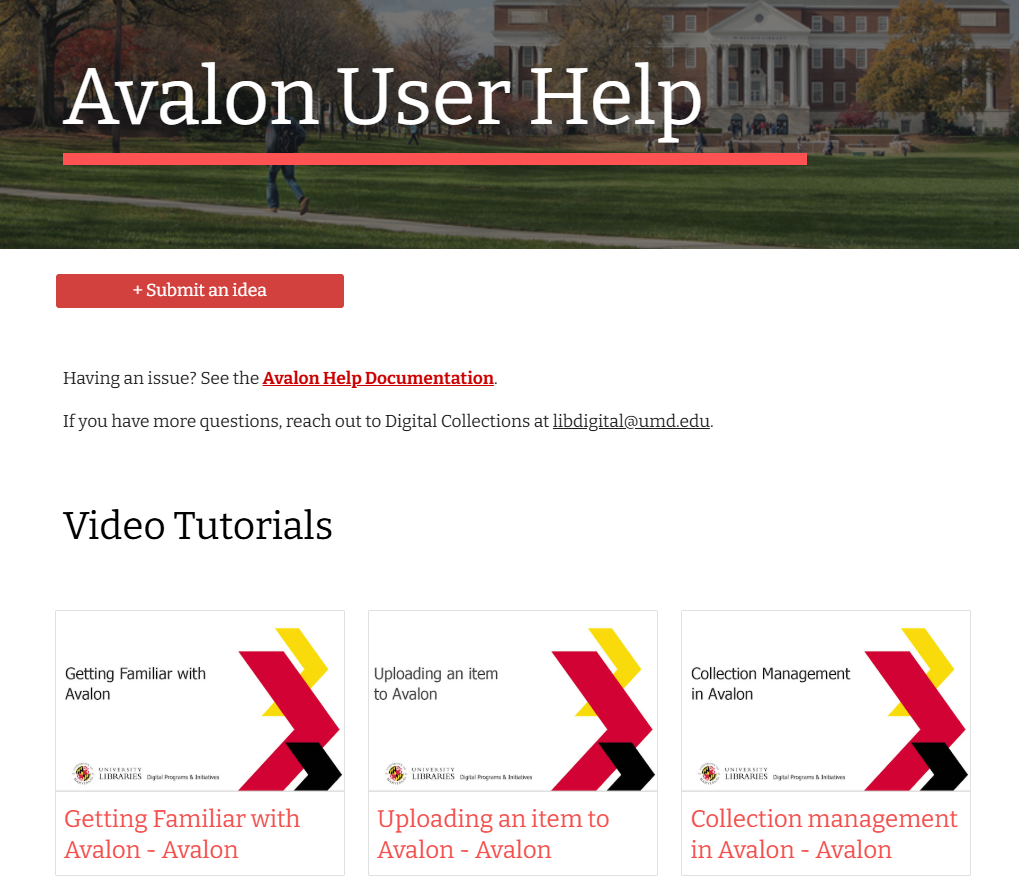
To achieve the established goals, the first step of implementation was establishment of a new help site for the digital library applications. A support page was designed to offer consistent training content, whether as first-time users or to refresh their knowledge. The page includes an email reflector to contact DPI (Digital Programs & Initiatives), a link to a comprehensive user guide, FAQs, six audiovisual tutorials to be developed and links to supplemental files. Various software platforms and tools were evaluated to determine the optimal method for hosting the support site. Since the tutorial needed to be developed in-house and the Library wanted to maintain control over upgrades and changes, Google Suites ultimately emerged as the best platform.
The next phase was to develop a series of new bitesize training modules for the digital library applications. A list of topics was identified to cover the major tasks staff users perform on the administrative interface. The training module began with a general overview of the system, addressing the basic functions performed by staff members responsible for creating, updating, and managing digital collections using the digital collection system interfaces. More advanced tasks, typically handled by senior-level employees, were covered in subsequent topics. The goal is to increase user confidence, positively impact the application usage, and ensure high-quality work.
In creating content for self-paced learning, each topic was divided into small pieces. Each user tutorial was designed to provide the appropriate amount of information and text, ensuring users are not overwhelmed. The training module utilizes Adobe Captivate to produce audiovisual instructional materials. Adobe Captivate is a program designed for creating instructional materials and videos for online learning. The program creates a video based on a slide which can be easily updated when a part of the video needs updating. It allows for easy updates to videos by modifying slides, and audio can be added and edited as necessary. Six tutorials have been created and embedded as part of the support system.
These tutorials adhere to self-paced learning principles, enabling staff to learn how to use the application anytime and anywhere. New users can begin training without waiting for scheduled sessions, and existing staff can refresh their knowledge independently. Each tutorial is crafted following online learning principles, dividing information into digestible segments and presenting it with meaningful visual aids. Current workflows have been studied and analyzed to write scripts, capture screenshots, record screen movements, and add voiceovers to complete the audiovisual tutorials. The learning modules were developed to make training concise and easy to follow.
In addition to being embedded as part of the support system, the learning modules need to be available at all times to provide immediate help when needed. The final step was ensuring immediate help is available to users as needed. This page is integrated with the digital collections applications, with a link to the support system added in the navigation menu, providing support whenever staff users need to learn. Integrating training modules with the staff interface guarantees easy access, eliminating the need to search for user guides. By incorporating the help site as a navigation menu item on the navigation bar, it functions as an easily accessible support system, allowing anyone to engage in desired training or refresher as needed.
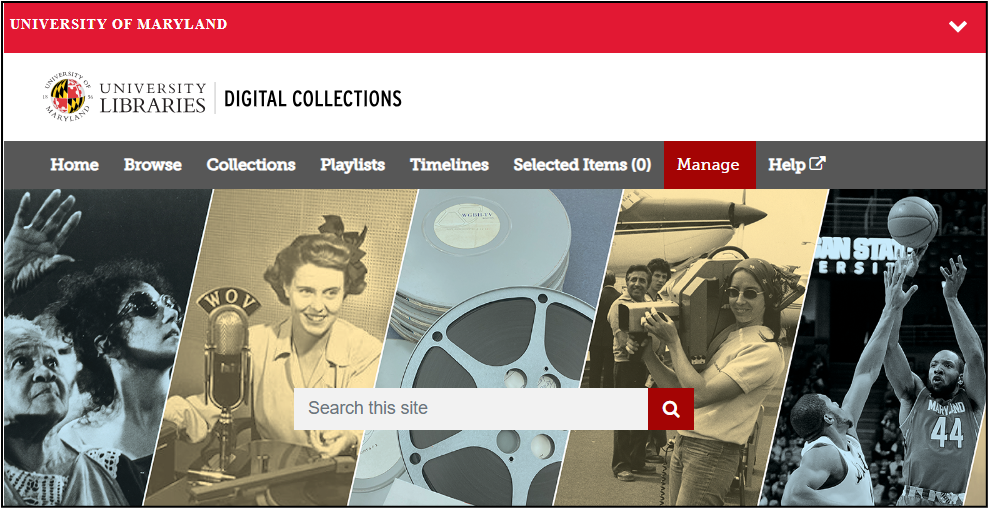
Image 1. Administrative interface of UMD Libraries’ Audiovisual repository with a Help link shown on the navigation bar, which links to the support system.
 |
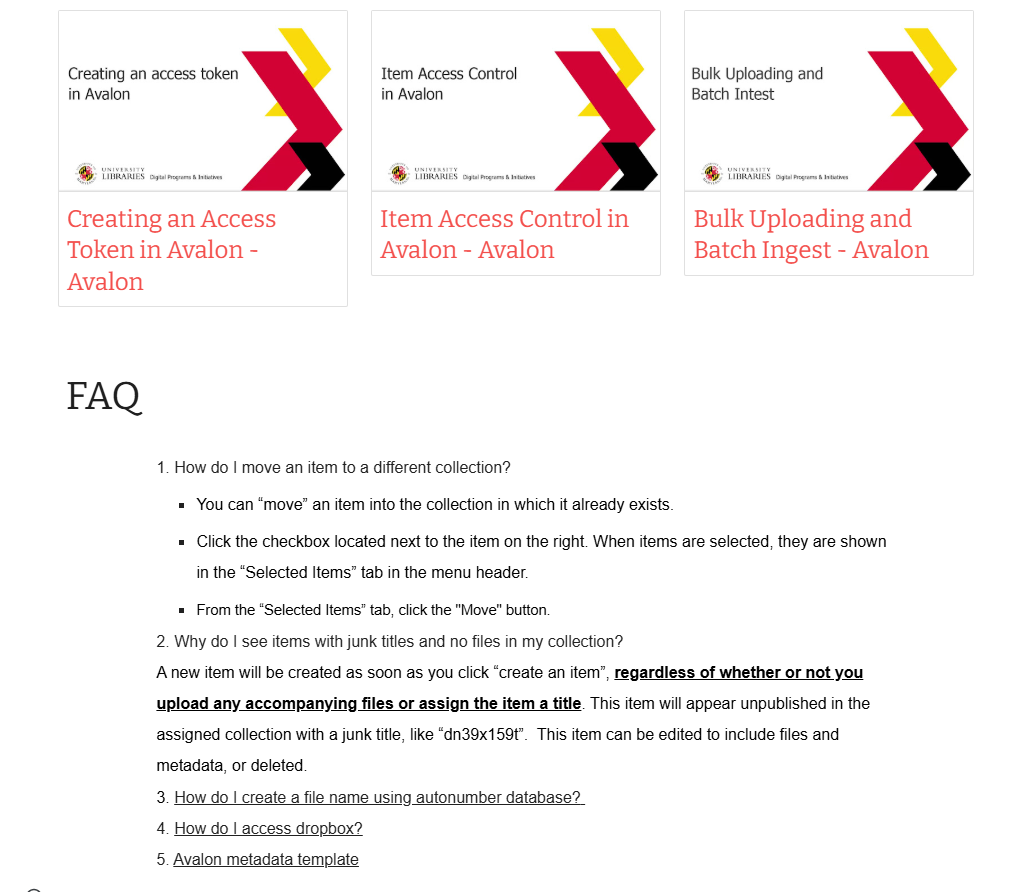 |
Image 2 & 3. The support system of UMD Libraries’ Audiovisual repository which includes an email reflector to contact DPI (Digital Programs & Initiatives), a link to a comprehensive user guide, FAQs, six audiovisual tutorials and links to supplemental files.
Outcome
The help page was prepared to go live and launch in Fall 2023. Between 2023 and 2025, UMD Libraries hired several new staff members, graduate assistants, and student workers at various times for different departments. DPI did not officially host a training session for new hires. Instead, the responsible party in each department directed new hires to the support system to start the training. New hires followed the link embedded in the navigation menu of the system and utilized the modules in the support system to receive required training. This readily available training module eliminates the need to schedule training sessions and removes the waiting period for new hires who start at various times throughout the year for the next available training session.
Work quality remained consistent with the turn over. DPI detected zero error in the system such as duplicate record or multi section of an item created as a separate item. The team concluded the positive results are due to the fact that the training modules delivered the same content for all trainees and trainees can repeat the training at their own speed. Existing staff members also utilized the training modules to refresh their knowledge of the system. DPI received a query asking how to type questions via email and the team replied with answers but was able to point to the support system if they needed further details. This allowed work to continue without disruption and eliminated the waiting time for a scheduled training.
New bitesize training integrated with the staff interface serves three primary goals. First, to ensure staff users receive timely support when needed. The new program will act as a support system accessible to personnel in each department anytime and anywhere. Second, to enable staff users to master the skills necessary to complete their work. The new administrative interface allows staff users to manage their items in the repository, helping them achieve their intended work goals efficiently and reliably. Lastly, to foster a sense of confidence that will emerge after a series of successful tasks, generating productive feedback for the system interface.
This project began as an initiative to offer ongoing support for staff users. Following positive feedback from the user groups and recognizing a similar need for the other digital library applications, the practice expanded to create training modules for the image and text repository system. The final product will increase the trainee’s confidence in their knowledge and skills, and affect their work behavior positively. By ensuring that staff users receive the support they need when they need, they will feel confident in their ability to complete tasks successfully. The well-trained staff were an essential part of further improvement of the interface by providing feedback and new ideas.
References
Chrysantina, A., Sæbø, J. I., & Kaasbøll, J. J. (2022). “Introducing online training for health staff: An institutional perspective”. The Electronic Journal of Information Systems in Developing Countries, 88(6), p.n/a. https://doi.org/10.1002/isd2.12233
Emerson, L. C., & Berge, Z. L. (2018). Microlearning: Knowledge management applications and competency-based training in the workplace. Knowledge Management & E-Learning, 10(2), 125–132. https://doi.org/10.34105/j.kmel.2018.10.008
Fox, A. (2016). “Why Training Fails and What to Change: A Case for Microlearning and Ongoing Management”. Employment Relations Today, 43(1), 41–45. https://doi.org/10.1002/ert.21549
Hartzler, B., Hinde, J., Lang, S. et al. (2023). “Virtual Training Is More Cost-Effective Than In-Person Training for Preparing Staff to Implement Contingency Management”. Journal of Technology in Behavioral Science. 8(3), 255–264. https://doi.org/10.1007/s41347-022-00283-1
Holbrook, A. M., Hunt, S. R., & See, M. R. (2022). “Process evaluation of dialectical behavior therapy dissemination: Knowledge retention and recursive training effects”. Current Psychology, 41(9), 6014–6023. https://doi.org/10.1007/s12144-020-01095-3
Hyochang Lim, Sang-Gun Lee, Kichan Nam. (2007). “Validating E-learning factors affecting training effectiveness”. International Journal of Information Management, 27(1), 22-35. https://doi.org/10.1016/j.ijinfomgt.2006.08.002
Holbeche, L. (2015). “Bitesize learning”. Training Journal, 11-12.
Hodell, C. (2015). ISD from the Ground Up: A No-nonsense Approach to Instructional Design (4th ed.). Association for Talent Development.
Javorcik, T., Kostolanyova, K., & Havlaskova, T. (2023). “Microlearning in the education of future teachers: Monitoring and evaluating students’ activity in a microlearning course”. Electronic Journal of E-Learning, 21(1), 13-25. https://doi.org/10.34190/ejel.21.1.2623
Jaokar, A. (2007). “Mobile Web 2.0, Microlearning, Intertwingularity, and Mobile Widgets”. Educational Technology, 47(6), 43–45. https://www.jstor.org/stable/44429529
Kamilali, D., & Sofianopoulou, C. (2015). Microlearning as Innovative Pedagogy for Mobile Learning in MOOCs. In International Association for Development of the Information Society. International Association for the Development of the Information Society.
Kitchin, S. (2015). “Good things come in small packages – developing online bitesize learning objects for researchers”. ALISS Quarterly, 10(2), 16–18.
Malamed, C. (2015). Visual Design Solutions: Principles and Creative Inspiration for Learning Professionals. Wiley.
Meng, D., Zhao, Q., & Jiang, L. (2017). “A theoretical understanding of self-paced learning”. Information Sciences, 414, 319-328. https://doi.org/10.1016/j.ins.2017.05.043